Quick answer: To send files from a Mac to a PC nearby, open Send via Wi-Fi in a browser on both and send directly, or turn on SMB file sharing in macOS and open the Mac from File Explorer. For very large amounts, copy to an external drive formatted as exFAT, which both systems can read and write.
Why Mac to PC needs a plan
AirDrop only works between Apple devices, and Windows cannot see it. Two other things trip people up. First, Mac drives are usually formatted as APFS or Mac OS Extended, which Windows cannot read without extra software. Second, macOS file sharing is switched off by default, so the PC cannot find the Mac on the network until you turn it on.
The good news is that every method below is free, and none of them changes your files.
Methods compared
| Method | Best for | Size | Setup |
|---|---|---|---|
| Send via Wi-Fi (browser) | Files and folders to a PC on the same network | No limit; needs free space on the PC | Open one page on both |
| SMB file sharing in macOS | Browsing and copying many folders | Limited by disk space | Sharing settings and the Mac password |
| External drive (exFAT) | Hundreds of GB, or no shared network | Size of the drive | Format the drive once |
| Cloud (iCloud, OneDrive, Google Drive) | Files you want in sync on both | Your cloud storage plan | Same account and app on both |
| Download link | A PC that is not nearby | Up to 20 GB per transfer | Only a browser |
Send via Wi-Fi from Safari to Edge or Chrome
- Open sharelargefilesfree.com/send-via-wifi on the Mac (Safari, Chrome or Firefox) and on the PC (Edge, Chrome or Firefox).
- Find the PC on the Mac's page. It appears with a name, an animal avatar and details such as "Windows · Edge".
- Click it and choose files, or drag files from Finder onto the page.
- Click Accept on the PC. The files are saved to its Downloads folder.
- Leave both pages open until the transfer completes.
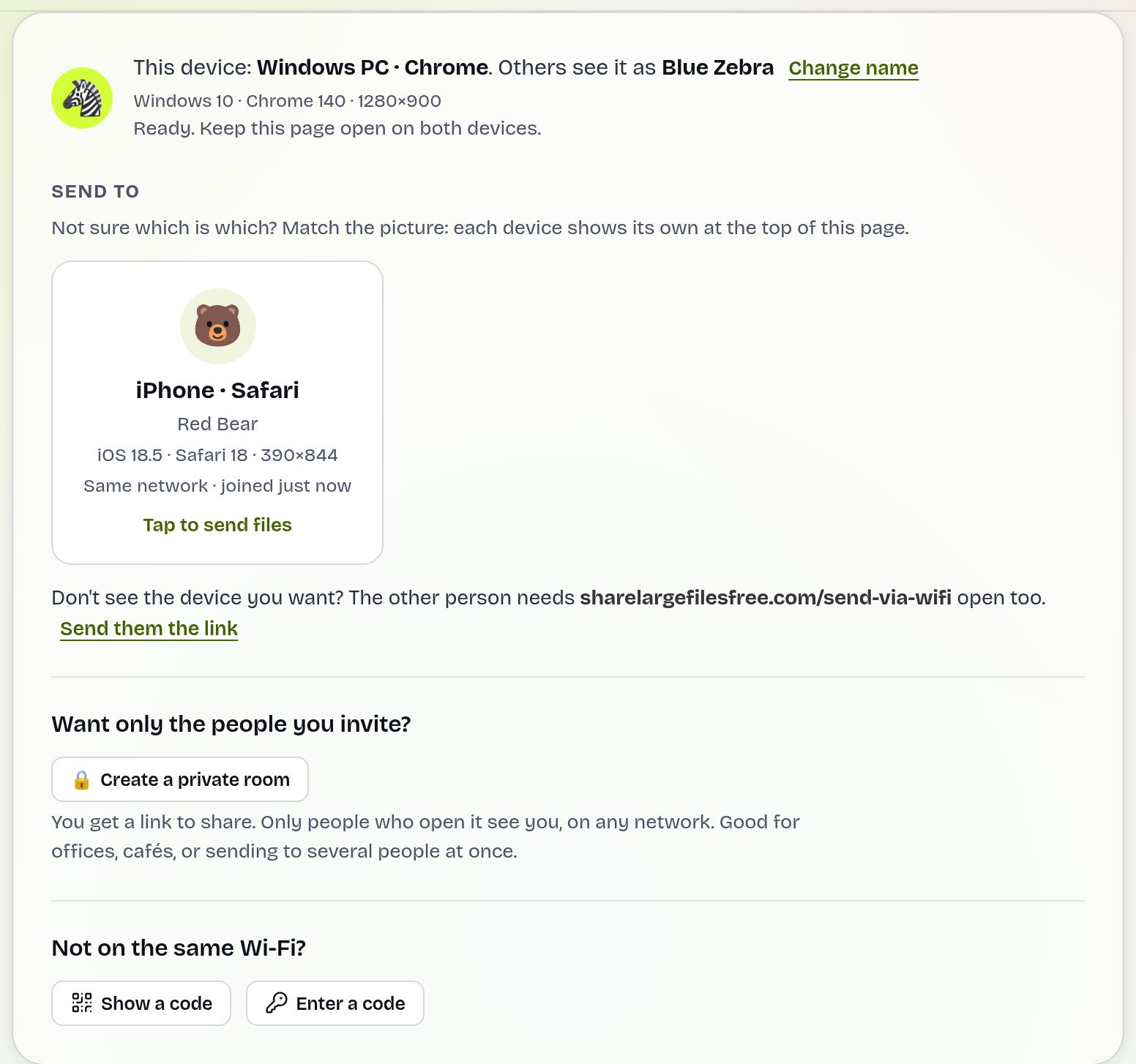
Files travel directly between the two browsers over an encrypted connection and are never stored on a server. There is no size or file count limit. Both computers need internet access for the introduction, and if they are on different networks you can type a 6-digit code instead. More detail is in transferring files over Wi-Fi.
SMB file sharing: open the Mac from File Explorer
- On the Mac, open System Settings > General > Sharing and turn on File Sharing. On older macOS it is under System Preferences > Sharing.
- Click the info button next to File Sharing, then Options. Make sure Share files and folders using SMB is on, tick your user under Windows File Sharing and enter your Mac password.
- Note the address shown in the File Sharing info, for example smb://192.168.1.20. Add folders under Shared Folders if needed.
- On the PC, type \\192.168.1.20 (your Mac's address) into the File Explorer address bar and sign in with your Mac username and password.
- Copy the folders you need onto the PC.
Turn File Sharing off again afterwards if you do not need it. The reverse also works: share a folder on Windows and connect from the Mac with Finder > Go > Connect to Server.
An external drive formatted as exFAT
A drive that came out of the box for a Mac is often APFS, which Windows cannot open. exFAT is read and written by both systems and handles files far larger than 4 GB.
- Back up anything already on the drive, because formatting erases it.
- On the Mac, open Disk Utility, select the drive, click Erase and choose ExFAT with the GUID Partition Map scheme.
- Copy your files in Finder, then eject the drive before unplugging it.
- Plug it into the PC and copy the files off in File Explorer.
A drive formatted as NTFS on Windows can be read by a Mac but not written to without extra software, which is why exFAT is the safer shared choice.
Cloud storage
iCloud for Windows from the Microsoft Store puts iCloud Drive and iCloud Photos in File Explorer. OneDrive and Google Drive both have Mac apps too. Drop files into the synced folder on the Mac and they appear on the PC. This is ideal for ongoing work, but free storage tiers are small and a large first sync can take a long time, so it is a slow way to move one big batch today.
Which should you use?
For a few files or a project folder to a PC on the same network, Send via Wi-Fi is the quickest, with nothing to set up. If you want to browse the whole Mac from the PC, turn on SMB file sharing. For a full move of hundreds of gigabytes, an exFAT drive is simple and dependable. If the PC is somewhere else, share a download link instead, up to 20 GB per transfer for 1 day. Going the other way? Read Windows to Mac.
Share Large Files Free is independent and is not affiliated with Apple, Microsoft or Google. Mac, macOS, AirDrop, iCloud and Safari are trademarks of Apple Inc.; Windows, Edge and OneDrive are trademarks of Microsoft Corporation; Google Drive and Chrome are trademarks of Google LLC.
Troubleshooting
- The PC cannot connect to the Mac. Use the IP address rather than the Mac's name, check that SMB is ticked in File Sharing options, and make sure the PC's network is set to Private.
- The password is rejected. Use your Mac account short name and login password, and confirm the user is ticked under Windows File Sharing.
- The drive does not show up on Windows. It is probably APFS or Mac OS Extended. Reformat it as exFAT on the Mac after backing it up.
- The computers do not see each other in Send via Wi-Fi. Guest or office networks may block device-to-device traffic. Use the 6-digit code, or a phone hotspot.
- Photos open as HEIC on the PC. Install the codec Windows offers, or convert copies with the HEIC to JPG tool.
Frequently asked questions
Can I AirDrop from a Mac to a Windows PC?
No. AirDrop only works between Apple devices. Send via Wi-Fi in the browser is the closest equivalent.
What drive format works on both Mac and Windows?
exFAT. Both systems can read and write it, and it supports files larger than 4 GB.
Do I need software to share files from a Mac to a PC?
No. macOS has SMB file sharing built in, and Send via Wi-Fi needs only a browser.
Is there a size limit with Send via Wi-Fi?
No. Only the free space on the PC limits it.
How do I send files from my Mac to a PC far away?
Upload them on the homepage, up to 20 GB per transfer, and share the link or download code.
Ready to send?
Drop your files, get a link, done. Free up to 20 GB — no account needed.
Send files free