Quick answer: To transfer files between Android and a Mac, open sharelargefilesfree.com/send-via-wifi in Chrome on the phone and in Safari or Chrome on the Mac, then pick the other device and send. It works in both directions, with no app and no size limit. For a cable, use Image Capture for photos or a free app such as OpenMTP for all files; Google's Android File Transfer app is no longer maintained.
Why Android and Mac need a workaround
Android phones share files over USB with a protocol called MTP. Windows supports it out of the box; macOS does not open it as a normal drive. Google used to offer a Mac app called Android File Transfer, but it has been discontinued and is no longer updated, and many people find it unreliable on recent macOS versions.
Wireless options are limited too: AirDrop is Apple-only, and Quick Share runs on Android, Chromebooks and Windows but not on the Mac. That leaves third-party cable apps, cloud storage and browser-based transfers.
Methods compared
| Method | Direction | File types | Size | Needs |
|---|---|---|---|---|
| Send via Wi-Fi (this site) | Both ways | Any | No limit, only free space | A browser on each, same Wi-Fi or hotspot |
| Image Capture over USB | Android to Mac | Photos and videos | Free space | A data cable, built into macOS |
| OpenMTP or similar app | Both ways | Any | Free space | A data cable and a third-party Mac app |
| Google Drive | Both ways | Any | Your Google storage | A Google Account |
| Download link (this site) | Both ways | Any | Up to 20 GB per transfer | A browser |
Send via Wi-Fi: Android to Mac or Mac to Android
- Connect the Mac and the phone to the same Wi-Fi. Away from Wi-Fi, turn on the phone's hotspot (mobile data on) and join it from the Mac.
- Open sharelargefilesfree.com/send-via-wifi in Chrome on the Android and in Safari, Chrome, Edge or Firefox on the Mac.
- Each device appears with a name, an animal avatar and details such as "Mac · Safari" or "Android · Chrome".
- On the device that has the files, click or tap the other one and pick the files. On the Mac you can also drag files onto the page.
- Accept on the other device, and keep both pages open, with the phone screen on, until it finishes.
- Files arrive in the Downloads folder: in Finder on the Mac, or in the Files app on the phone.
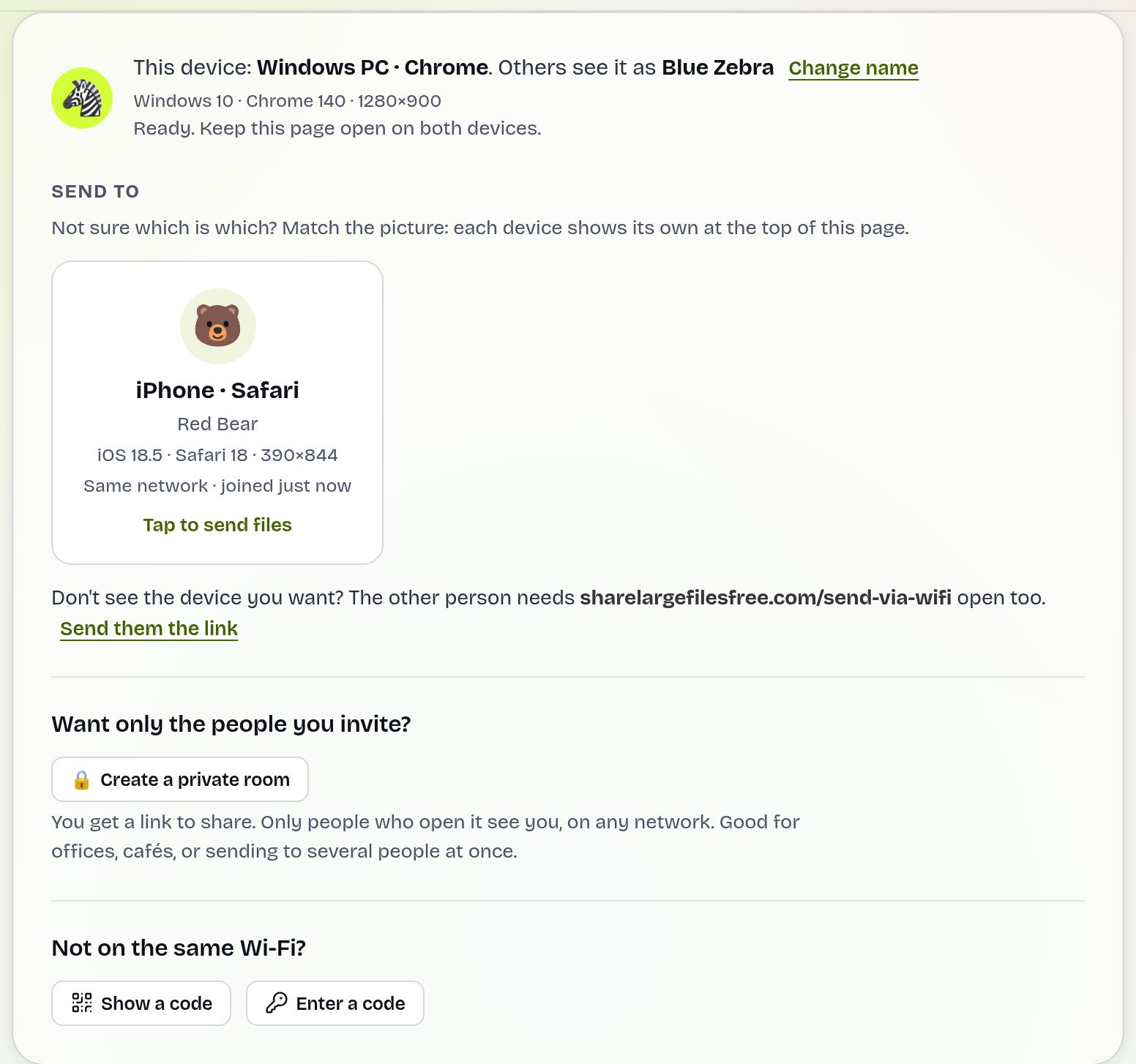
The transfer runs directly between the two devices over an encrypted connection and nothing is stored on a server. If the Mac and phone are on different networks, type the 6-digit code or scan the QR code with the phone.
Sending a whole project folder from the Mac to the phone? Right-click the folder in Finder and choose Compress to make one ZIP file, send that, and open it in the Files app on Android, which can extract ZIP files on most recent phones. In the other direction, select all the photos or videos you need in the phone's picker at once; there is no limit on how many.
With a USB cable: Image Capture and OpenMTP
Photos and videos only, with nothing to install:
- Connect the phone with a data cable and unlock it.
- Tap the USB notification and choose PTP or Transferring images (the wording varies).
- Open Image Capture on the Mac (or the Photos app), select the phone and import.
Any file, both directions: install a free MTP app such as OpenMTP, set the phone's USB mode to File transfer, and drag files between the Mac and the phone's folders. Paid apps like MacDroid do the same. Behaviour can change with macOS updates, so check the app's own notes for your version.
Google Drive and download links
Google Drive works in both directions: upload from the Drive app on the phone or drive.google.com on the Mac, then download on the other device. It is handy for files you want to keep online, but it uses your Google storage and every file has to upload fully first.
For a one-off transfer, a link from the homepage needs no account: upload up to 1000 files or a whole folder from the Mac (up to 20 GB), then open the link, QR code or download code on the phone. Links expire after 1 day.
Which should you use?
For most people, Send via Wi-Fi is the easiest in both directions: no cable, no app, no size limit. To import a whole camera roll, use Image Capture with a cable. To browse and manage the phone's folders from the Mac regularly, install OpenMTP. For files you also want in the cloud, Google Drive.
See also sending large files from a Mac and Android to PC if you also use Windows.
Share Large Files Free is independent and is not affiliated with Apple, Google or the makers of OpenMTP or MacDroid. Mac, macOS, Safari, AirDrop and Image Capture are trademarks of Apple Inc.; Android, Google Drive and Quick Share are trademarks of Google LLC.
Troubleshooting
- The Mac does not see the phone over USB. Unlock the phone, choose File transfer or PTP in the USB notification, and try another cable; many cables only charge. Close other apps that may hold the connection, such as an old Android File Transfer install.
- The devices do not see each other in Send via Wi-Fi. Check both are on the same network and online. Office and guest Wi-Fi may block direct connections; use the phone's hotspot or the 6-digit code.
- The transfer stalls on the phone. Keep the browser in front and the screen on; battery savers pause background tabs.
- The Mac cannot play an Android video. Some formats need another player. VLC opens most, or convert a copy with the video to MP4 converter.
- Safari blocks multiple downloads. Allow downloads for the site when Safari asks.
Frequently asked questions
Does Android File Transfer still work on Mac?
Google has discontinued it and it is no longer updated. Use Send via Wi-Fi, Image Capture for photos, or a maintained app such as OpenMTP.
Can I use Quick Share with a Mac?
No. Quick Share is available for Android, Chromebooks and Windows, not macOS.
How do I send files from a Mac to an Android phone?
Open sharelargefilesfree.com/send-via-wifi on both, click the phone on the Mac and drop the files onto the page.
Is there a size limit?
Send via Wi-Fi has no size or count limit. Download links carry up to 20 GB per transfer.
Can I import Android photos to a Mac without an app?
Yes. Set the phone's USB mode to PTP and use Image Capture or the Photos app on the Mac.
Ready to send?
Drop your files, get a link, done. Free up to 20 GB — no account needed.
Send files free