Quick answer: Snapdrop, PairDrop and Send via Wi-Fi all send files directly between browsers on the same network with no app or account. Send via Wi-Fi adds device details, a 6-digit pairing code, lockable private rooms and Send to everyone, and the same site makes download links when the other person is not nearby. PairDrop is open source and can be self-hosted, which we do not offer.
Snapdrop and PairDrop in short
Snapdrop was an early open-source web app that brought AirDrop-style sharing to any browser: open the page on two devices on the same network and they see each other. In 2023 it came under LimeWire, and many users moved to PairDrop, an open-source project that started as a fork of Snapdrop.
PairDrop has added useful features over time, such as pairing devices so they can find each other on different networks, temporary public rooms, sending text messages, and the option to host your own copy. Both projects change, so check their pages for current features.
The honest summary: these tools and Send via Wi-Fi do the same basic thing in the same way, with files going directly between browsers over WebRTC. The differences are in the details.
Where Send via Wi-Fi differs
- Device details. Each device shows a name, an animal avatar and details such as "Android 14 · Chrome" or "Mac · Safari", plus whether it is on the same network or paired with a code. Useful when three laptops look alike.
- A 6-digit pairing code. Not on the same Wi-Fi? Show a code on one device and type it on the other, or scan the QR code.
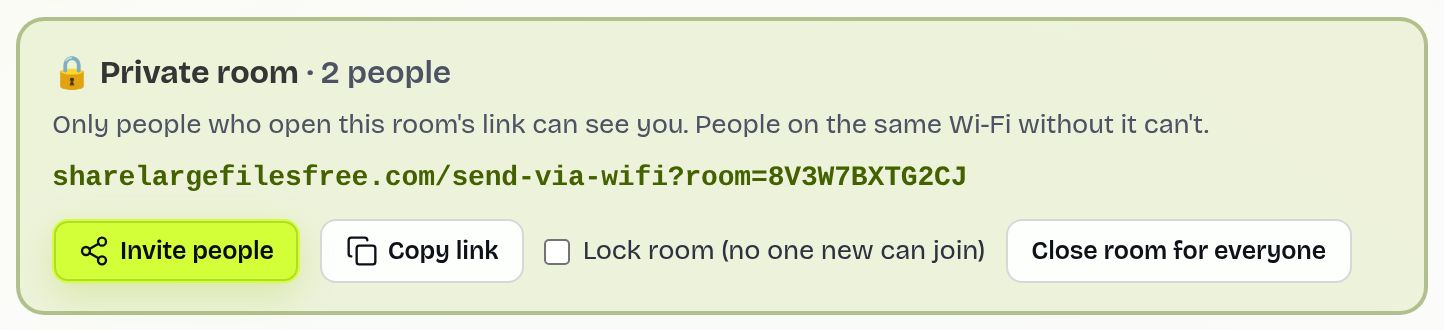
- Private rooms you control. Create a private room gives a link; only people who open it see each other, on any network. The creator can lock the room so no one new joins, remove a device, or close the room for everyone.
- Send to everyone. With two or more devices listed, one tap sends the same files to all of them, and each person accepts on their own.
- Download links on the same site. When the other person is not online at the same time, upload on the homepage instead and get a link that lasts 1 day.
Side by side
| Question | Snapdrop / PairDrop | Send via Wi-Fi |
|---|---|---|
| Runs in the browser, no account | Yes | Yes |
| Direct, encrypted transfer | Yes, WebRTC | Yes, WebRTC with DTLS |
| Different networks | PairDrop: pairing and public rooms | 6-digit code, QR code or private room |
| Lock a room, remove a device | Check the current version | Yes, for the room creator |
| One tap to send to every device | Check the current version | Send to everyone |
| Open source, self-hostable | Yes | No |
| Link for later download | Not the main use | Yes, up to 20 GB |
Snapdrop and PairDrop details reflect their public pages at the time of writing and may change.
How to use Send via Wi-Fi
- Open sharelargefilesfree.com/send-via-wifi on both devices on the same Wi-Fi or hotspot.
- Check the picture at the top so you know which avatar is yours. Tap Change name if you want a clearer name.
- Tap the other device and pick files, or drop them on it on a computer.
- The other person taps Accept. Keep both pages open until it finishes; files go to Downloads.
To share with a group on busy Wi-Fi, tap Create a private room, then Copy link or Invite people. When everyone has joined, turn on Lock room (no one new can join) and use Send to everyone.
When a link works better
Browser-to-browser sharing needs both people online with the page open at the same moment. If that is not possible, send a download link: up to 20 GB per transfer, a QR code and a short code to type at /receive, an optional password, and files kept in original quality for 1 day.
Which should you use?
If you want open-source software, or to run your own server on your network, PairDrop is the better fit and we do not offer that. If you want clear device details, a room you can lock, one tap to send to several devices, or the option to switch to a link without changing site, try Send via Wi-Fi. For a quick file between two of your own devices, any of them will do the job well.
See transfer files over Wi-Fi and AirDrop alternatives for more.
Share Large Files Free is independent and is not affiliated with, endorsed by or sponsored by Snapdrop, PairDrop or LimeWire. These names are trademarks or project names of their respective owners; AirDrop is a trademark of Apple Inc.
Troubleshooting
- The other device is missing. Both pages must be open. A second tab in the same browser is you, not another device, so it is not listed.
- Different networks. Use the 6-digit code or a private room link.
- "This room is locked". Ask the creator to unlock it, or to send you files another way.
- Transfers fail on office Wi-Fi. Some networks block direct connections. Try a hotspot or a download link.
- A very large file to an iPhone stalls. Safari keeps it in memory until complete; use a download link instead.
Frequently asked questions
Is Send via Wi-Fi like Snapdrop?
Yes, the idea is the same: open the page on two devices and send directly between browsers. It adds device details, lockable private rooms and Send to everyone.
Is it open source like PairDrop?
No. If you need open-source or self-hosted software, PairDrop is the better choice.
Can I send to several devices at once?
Yes. With two or more devices listed, Send to everyone sends the same files to each, and each one accepts.
Does it work across networks?
Yes, with a 6-digit code, a QR code or a private room link.
Are you affiliated with Snapdrop or PairDrop?
No. Share Large Files Free is independent.
Ready to send?
Drop your files, get a link, done. Free up to 20 GB — no account needed.
Send files free