Quick answer: For nearby devices, Send via Wi-Fi works like SHAREit but in any browser: no app, no account, no ads on the transfer screen and no size limit, with files going directly between the two devices. SHAREit can still be the better choice where there is no internet at all, because it can create its own connection. For people who are not nearby, a download link works on any network.
What SHAREit does well
SHAREit has been one of the most downloaded file sharing apps for years, especially on Android. Its main strength is that it can connect two phones directly, using a Wi-Fi connection that the app sets up itself, so it can move files when there is no router and no mobile data. That makes it handy on a bus, in a village with poor signal, or anywhere the internet is slow or expensive.
It has also offered apps for iPhone and for computers over the years, and it is good at sending apps, music and videos between Android phones. Check the official app store listing for what is supported on your device today, as features and platforms change between versions.
Why some people look for an alternative
- An app on both phones. The other person has to install SHAREit too, which is a hurdle for a one-off transfer, and impossible on a work computer where you cannot install software.
- Ads and extra content. The free app is supported by ads and over time has added videos, games and other content around the sharing feature. Many users find this cluttered.
- Permissions. Like most local sharing apps it asks for access to storage, location and nearby devices, which some people prefer not to grant.
- Past security reports. In 2021 security researchers at Trend Micro published a report describing vulnerabilities in the Android app. The developer said issues had been addressed. Whatever app you use, keep it updated from the official store.
- Availability. SHAREit was among the apps blocked in India in 2020, so whether it is available to you can depend on where you live.
SHAREit and Send via Wi-Fi side by side
| Question | SHAREit | Send via Wi-Fi |
|---|---|---|
| Install needed | Yes, on both devices | No, it runs in Chrome, Edge, Firefox or Safari |
| Works with no internet at all | Yes, the app can make its own connection | No, both devices need internet to find each other |
| Ads on the sharing screen | Yes, in the free app | No |
| Size limit | Depends on the app and device | None beyond free space on the receiver |
| Where files go | Directly between the devices | Directly between the browsers, encrypted (WebRTC with DTLS), never stored on a server |
| Devices it reaches | Devices with the app | Any phone, tablet or computer with a modern browser |
| Recipient far away | Not the main use | Use a 6-digit code, or a download link instead |
SHAREit details reflect public information at the time of writing and can change between versions.
How to send files with Send via Wi-Fi
- Connect both devices to the same Wi-Fi. No router? Turn on the mobile hotspot on one phone and join it from the other. Mobile data must stay on, because the page needs the internet to introduce the two devices.
- Open sharelargefilesfree.com/send-via-wifi on both devices. There is nothing to install and no account.
- Find the other device in the list. It shows a name, an animal avatar and details such as "Android phone · Chrome", so you can tell which is which.
- Tap it and pick your files. On a computer you can also drop files onto the device.
- The other person taps Accept. Keep both pages open and the screens on until it finishes. Files land in the Downloads folder.
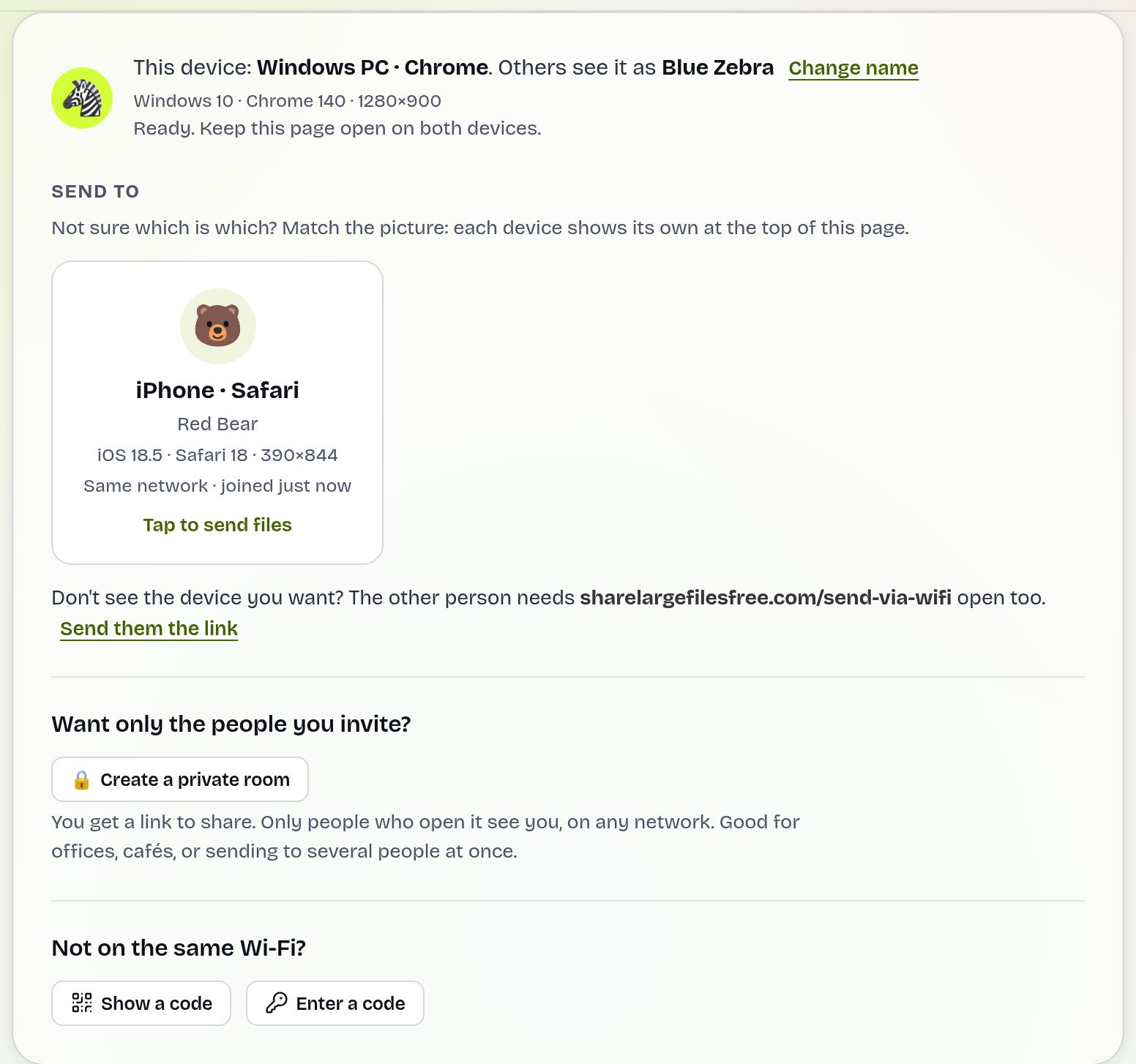
If the devices are not on the same network, tap Show a code on one and type the 6-digit code on the other under Enter a code, or scan the QR code. See sending over a hotspot for the no-router case in detail.
When the other person is not nearby
SHAREit is built for devices in the same place. For someone in another city, upload on the homepage instead: up to 20 GB and 1000 files per transfer, no account. You get a link, a QR code and a short download code they can type at /receive. They can download any time within 1 day, files arrive byte for byte in original quality, and you can add a password.
Which should you use?
Be honest about where you are. If there is no internet at all, SHAREit or a similar offline app is the better tool, because Send via Wi-Fi needs both devices online for a moment to find each other. If both devices have internet, Send via Wi-Fi saves installing an app on each phone, has no ads in the way, and also works with iPhones and laptops in the same browser. If the other person is not with you, send a download link.
For specific devices see Android to iPhone, Android to Android and Android to PC.
Share Large Files Free is independent and is not affiliated with, endorsed by or sponsored by SHAREit or its owners. SHAREit is a trademark of its owner; other product names are trademarks of their respective owners.
Troubleshooting
- The other device does not appear. Check both are on the same Wi-Fi and that a VPN is not switched on, or use the 6-digit code.
- Using a hotspot and nothing connects. The hotspot phone needs mobile data on. Without any internet, Send via Wi-Fi cannot pair the devices.
- Devices appear but the transfer never starts. Some office and guest Wi-Fi blocks devices from talking to each other. Use a hotspot or a download link.
- The transfer stops halfway. A phone may have locked its screen or moved the browser to the background. Keep it in front and try again.
- A large video fails on an iPhone. Safari holds an incoming file in memory until it is complete. Send very large files to an iPhone as a download link.
Frequently asked questions
Is there a SHAREit alternative without an app?
Yes. Open sharelargefilesfree.com/send-via-wifi in the browser on both devices and send directly over your Wi-Fi.
Does it work without internet like SHAREit?
No. Both devices need an internet connection to find each other; the files themselves then go directly between them.
Are there ads?
There are no ads on the Send via Wi-Fi transfer screen.
Can I send from Android to iPhone?
Yes. It works between any devices with a modern browser, including iPhone, Android, Mac and Windows.
Are you connected to SHAREit?
No. Share Large Files Free is an independent service.
Ready to send?
Drop your files, get a link, done. Free up to 20 GB — no account needed.
Send files free